
How many square metres is that room?
Trace the room on the PDF plan and read the area, with every side length labelled. Skirting and trim as a run with its total. Straight off the plan, on your phone.
No account · No cloud · Works offline · iPhone, iOS 26+
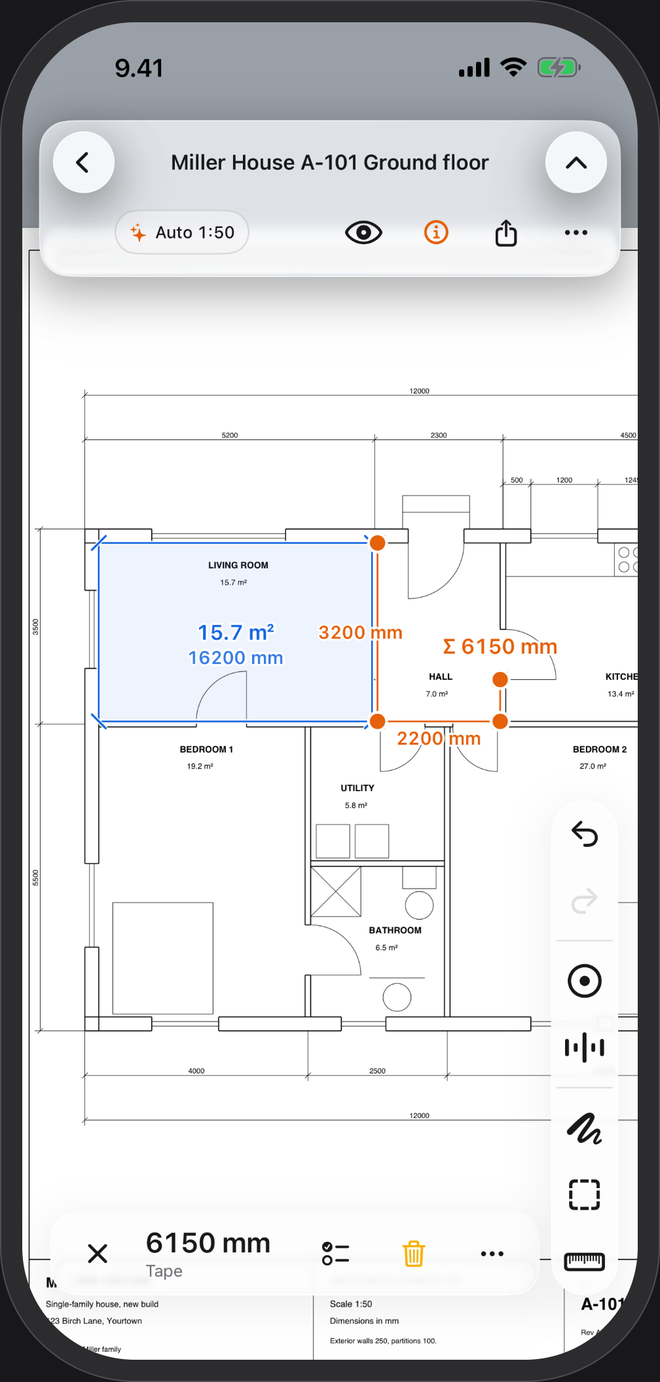
From plan to square metres
- Open the planOn a CAD-exported PDF the scale is read from the printed dimensions as it opens.
- Trace the roomRectangle for a square room, Odd shape for L-shapes and everything else. Each corner lands on the drawing's own lines.
- Read the areaThe area and every side length are labelled on the plan. Measure the next room; each one stays where you drew it.
For flooring, tiles, skirting and paint
Floor area
Room by room, for flooring, tiles, underfloor heating or screed. Add your usual allowance for cuts and waste.
Running metres
Measure a run around the room for skirting, trim or tile edging: every segment labelled, with the total.
Wall area for paint
Measure the wall run, then multiply by the ceiling height from the section drawing.
Hand it on
Share a take-off summary as CSV or a one-page PDF — or the plan itself with every area drawn on it.
Questions
Can it do square feet?
Yes. Set Settings → Units to Feet + inches and areas read in square feet. US plans in feet and inches →
What about L-shaped or angled rooms?
Use Odd shape and place a point at each corner. The area and every side length update as you go.
What if the plan is scanned?
It opens. Set the scale by tracing a length you know, then measure freely. Corner snapping needs a vector PDF, the kind exported from CAD.
How exact is it?
As exact as the drawing and its scale. It is a working aid for planning and ordering: check critical dimensions on site before you cut.